
Manual
Why mclovin exists?
mclovin started from three daily annoyances: Spotify links opening in the browser instead of the app, work repo links landing in the wrong Chrome profile, client Google Meet links opening where the work webcam was wired up. On macOS I solved it with Finicky and thought I was set.
With AI to speed up the prototype, the first version was working in a few minutes and fixed my own setup. Solving it just for me felt small. I spent more time polishing it into something anyone hitting the same wall can use.
The mission is to cover all three desktop systems and, along the way, expose what operating systems and browsers have been failing to do for too long. Linux x86_64 and macOS Apple Silicon are working today; Windows is coming next. Hit a problem? Open an issue on GitHub. You click a link and it opens in the right place. No "which Chrome profile was that again", no closing the wrong window, no two-minute detour for every link.
Install
Linux x86_64 and macOS arm64 (Apple Silicon). Windows is next.
curl -fsSL https://mclovin.org/install.sh | bash
The script detects your platform and does the right thing:
- Linux — downloads the binary into
~/.local/bin/mclovin, registers mclovin as the system default browser, and installs themclovin.desktopentry into the app menu. Open mclovin from your launcher (Walker, rofi, GNOME/KDE app menu). - macOS — downloads the binary into
~/.cargo/bin/mclovin, strips the Gatekeeper quarantine xattr, creates~/Applications/mclovin.app, and opens System Settings → Desktop & Dock. Pick mclovin under "Default web browser" to finish setup (macOS 26 blocks unsigned apps from setting the default programmatically). After that, open mclovin from Spotlight or the Dock.
How to use
Same mclovin, two paths: a GUI you drive with arrows + Enter, or a CLI for scripts. Rules live on disk in rules.toml, so the only thing that changes is how you reach them.
1. Picker — when you click an unmatched link
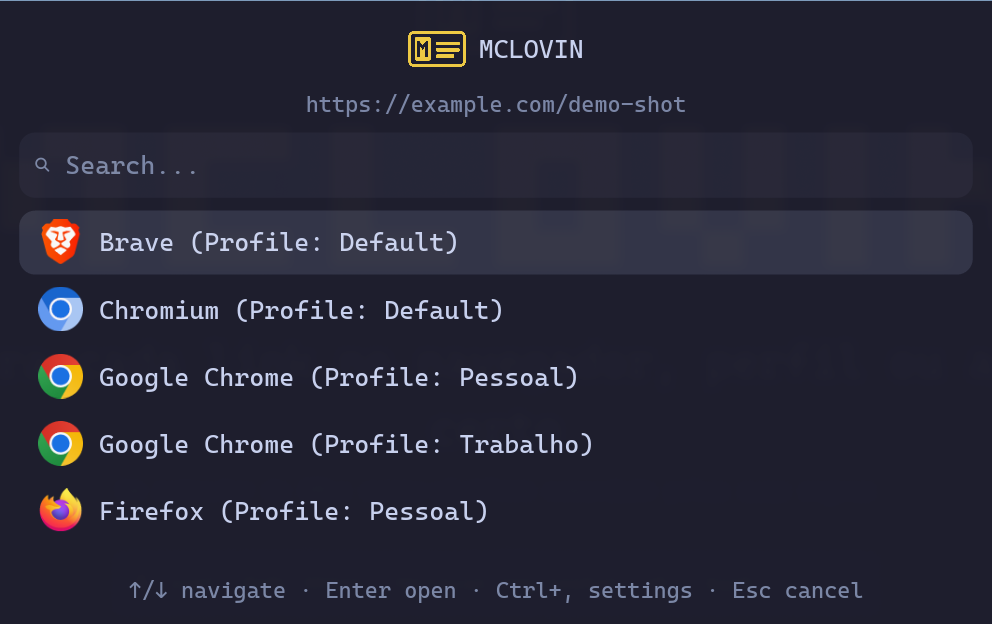
Whenever a URL doesn't match any rule in rules.toml, the picker jumps in. URL at the top, detected browsers below. ↑/↓ or k/j to navigate, Enter to open. Ctrl+, takes you into Settings without losing the URL.
2. Settings — mclovin settings
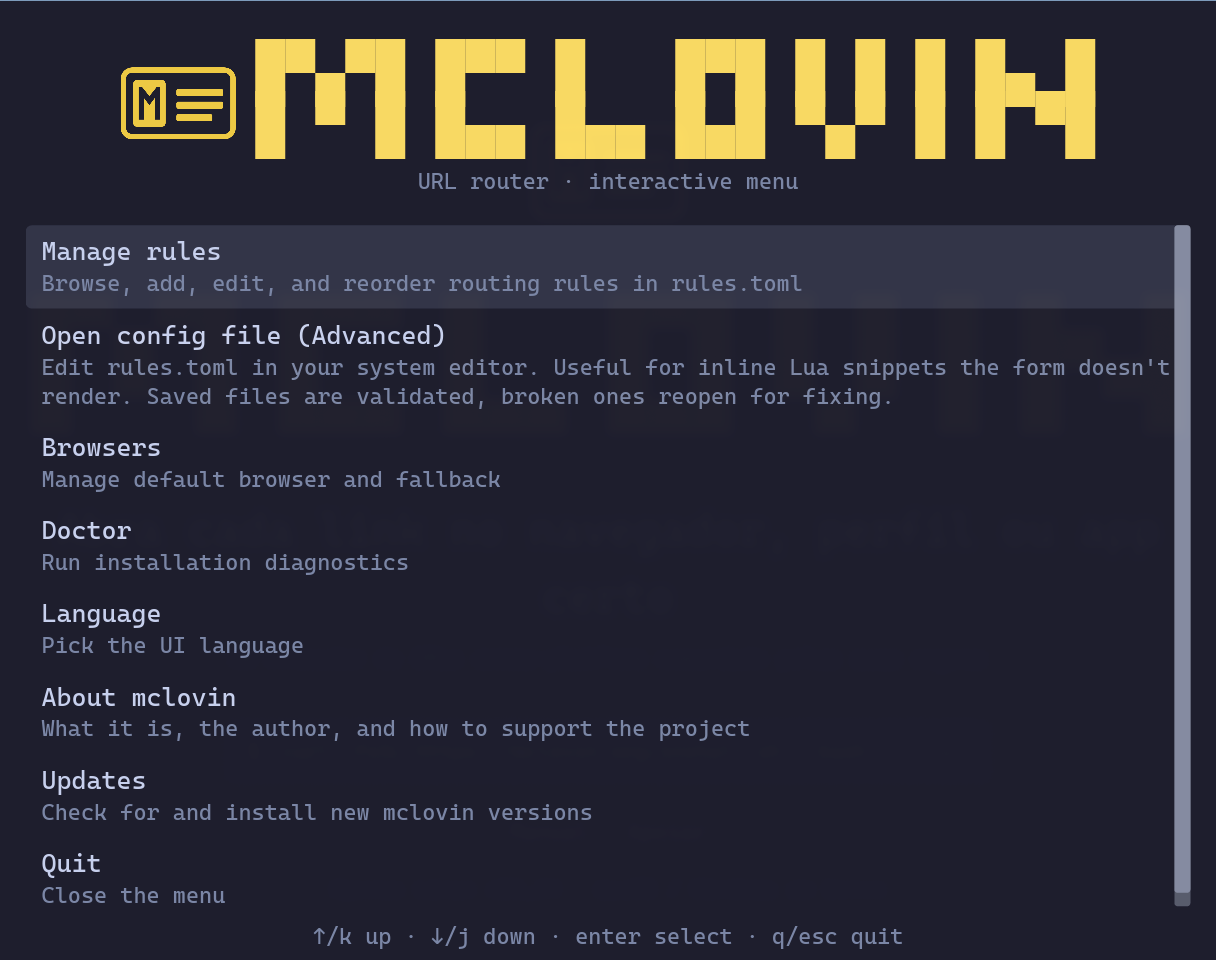
The hub. Each row leads to a sub-menu: rules, default browser, doctor, language, updates. ↑/↓ navigates, Enter activates, q/Esc backs out.
3. Manage rules
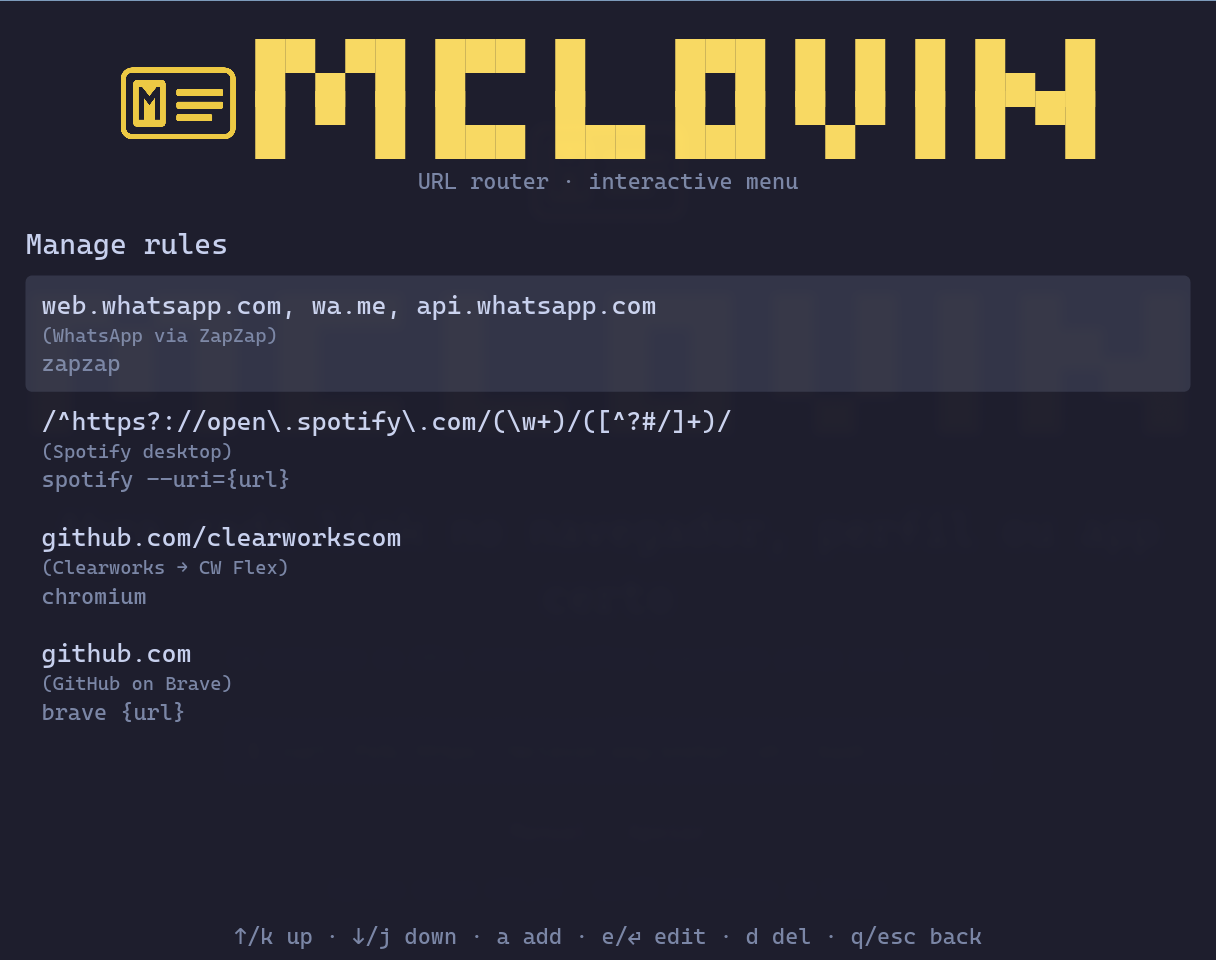
Lists every rule: pattern on the left, command or browser on the right. a adds, e or Enter edits, d deletes (with a confirm prompt), J/K reorders.
4. Add / edit a rule
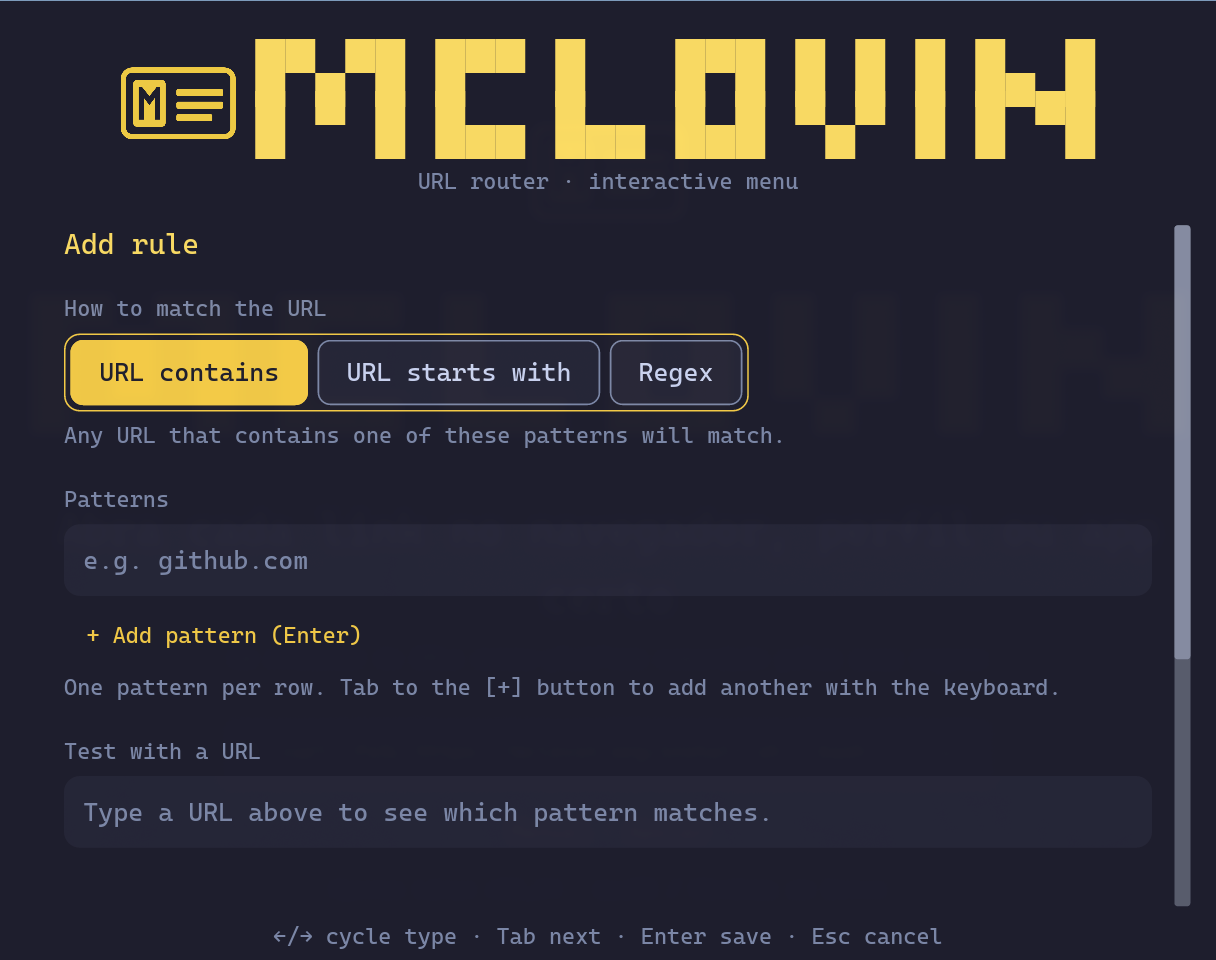
Three match kinds: URL contains (substring), URL starts with (host + path), Regex (full control). Pattern list below — Tab walks them and lands on + Add pattern (Enter). The "Test with a URL" field validates in real time which pattern would match.
5. Leaving a form with unsaved changes
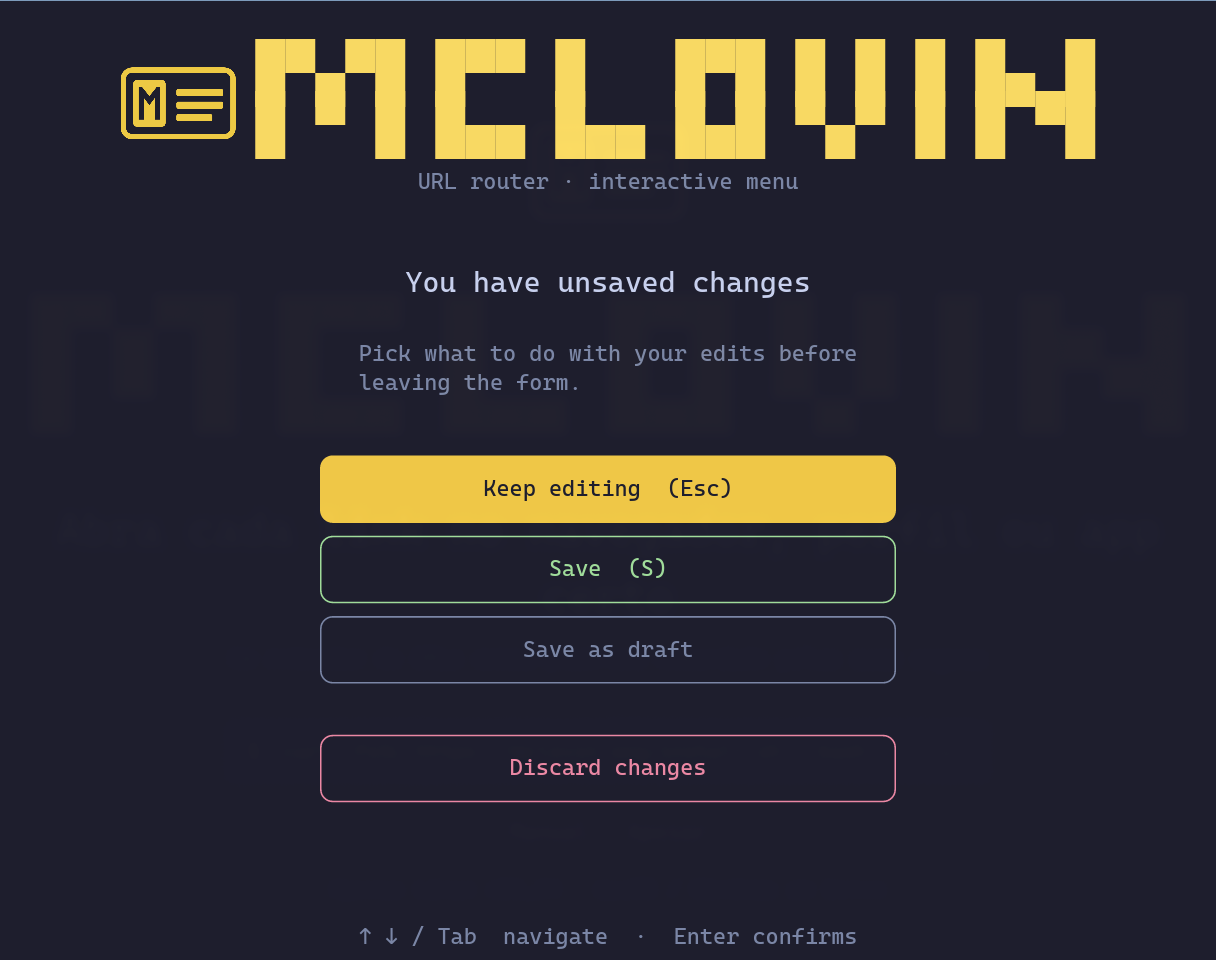
Esc on a dirty form opens this guard. Keep editing (Esc) is the default and safe. Save (S) validates and persists. Save as draft parks everything in a draft that resumes next time. Discard changes, split off in red, throws the edits away.
6. Updates — Ctrl+U from any screen
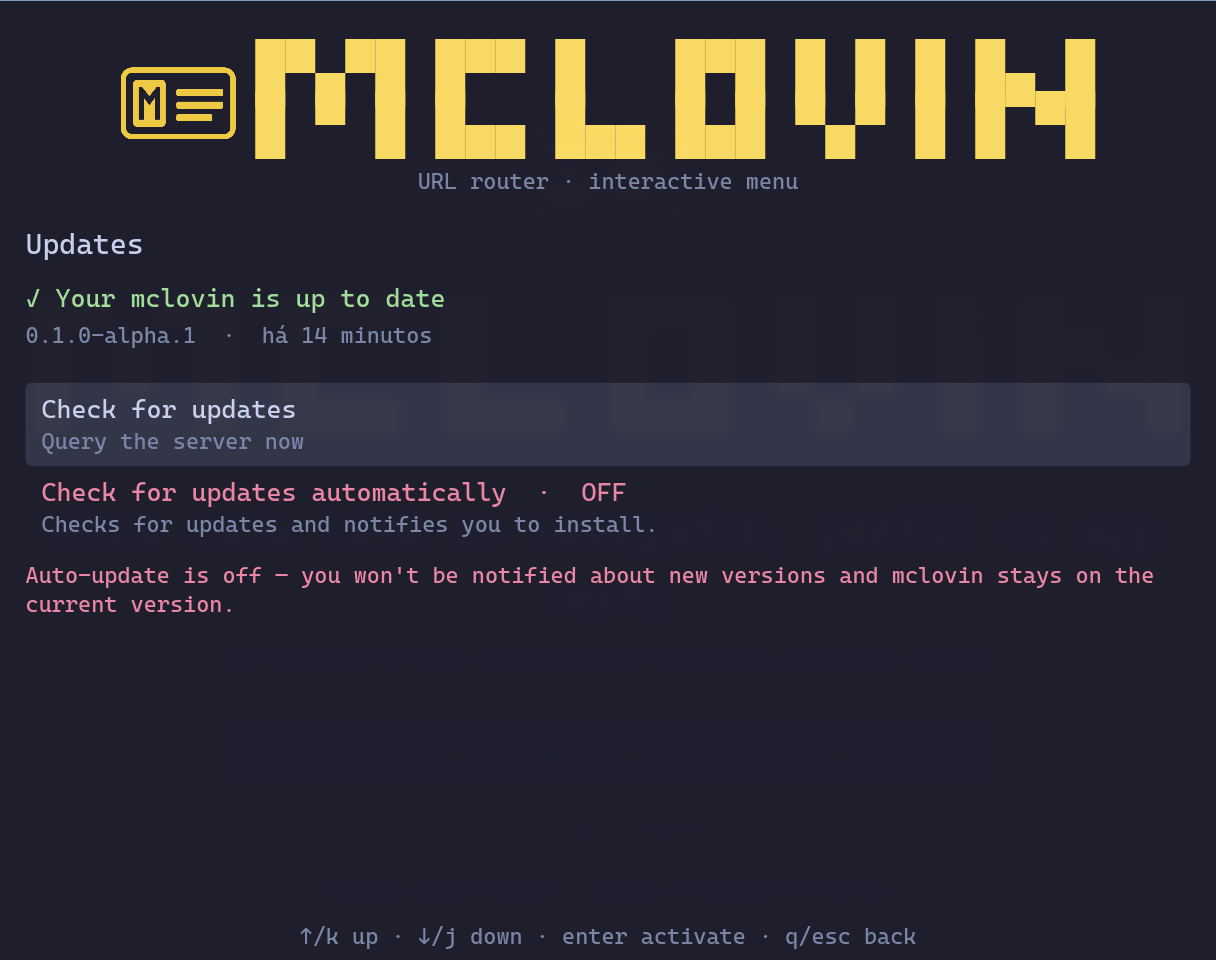
Shows current version, when it was last checked, and — when a new release is up — an "Install now" button that downloads the binary, verifies the sha256, and runs the restart cycle with a progress bar and countdown.
7. Default browser — Ctrl+D from any screen
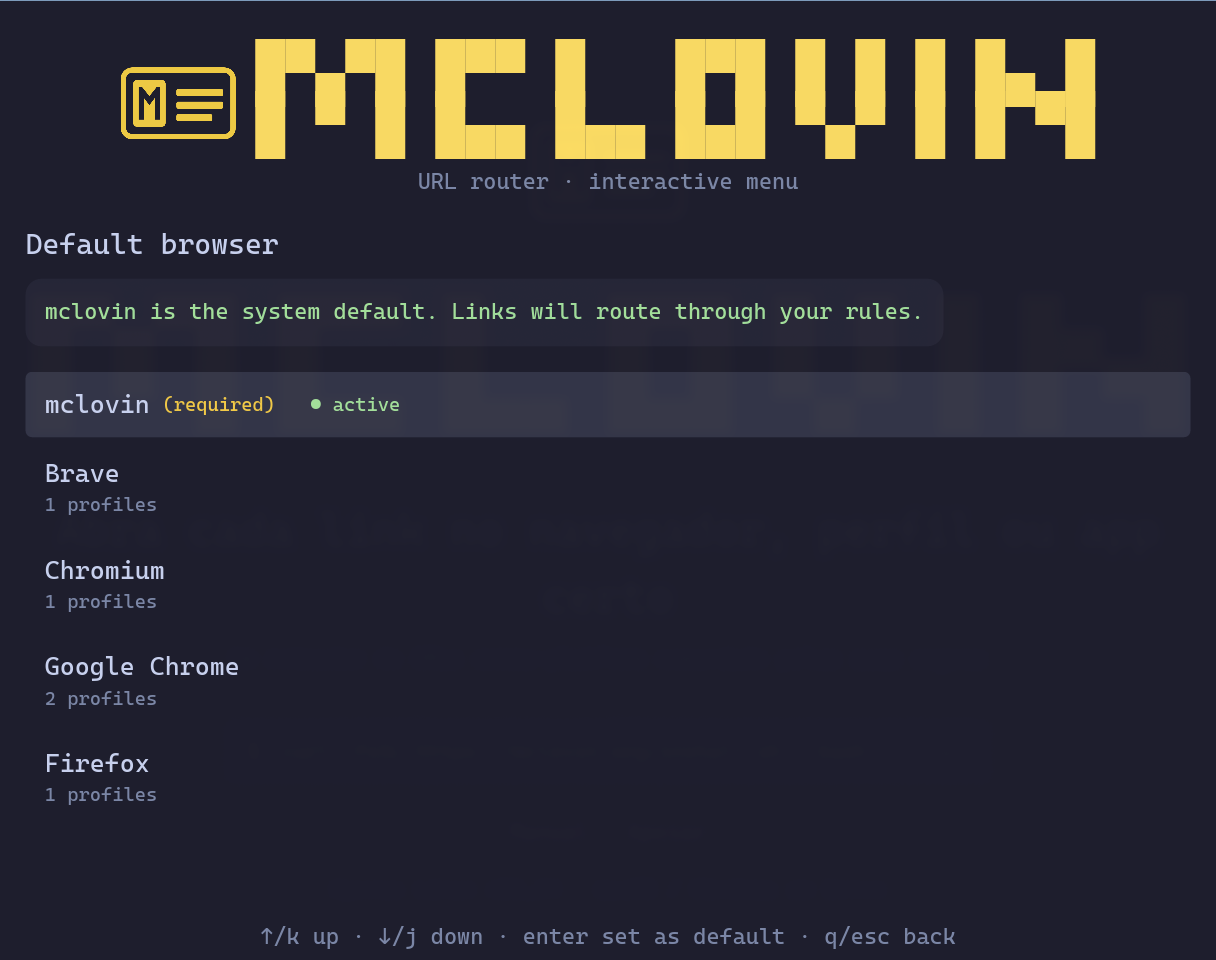
Lists detected browsers; the marked line is the system's current handler. Enter on another entry swaps via xdg-mime/xdg-settings. mclovin sits at the top as "required" — it has to be the default for routing to do anything.
8. Doctor
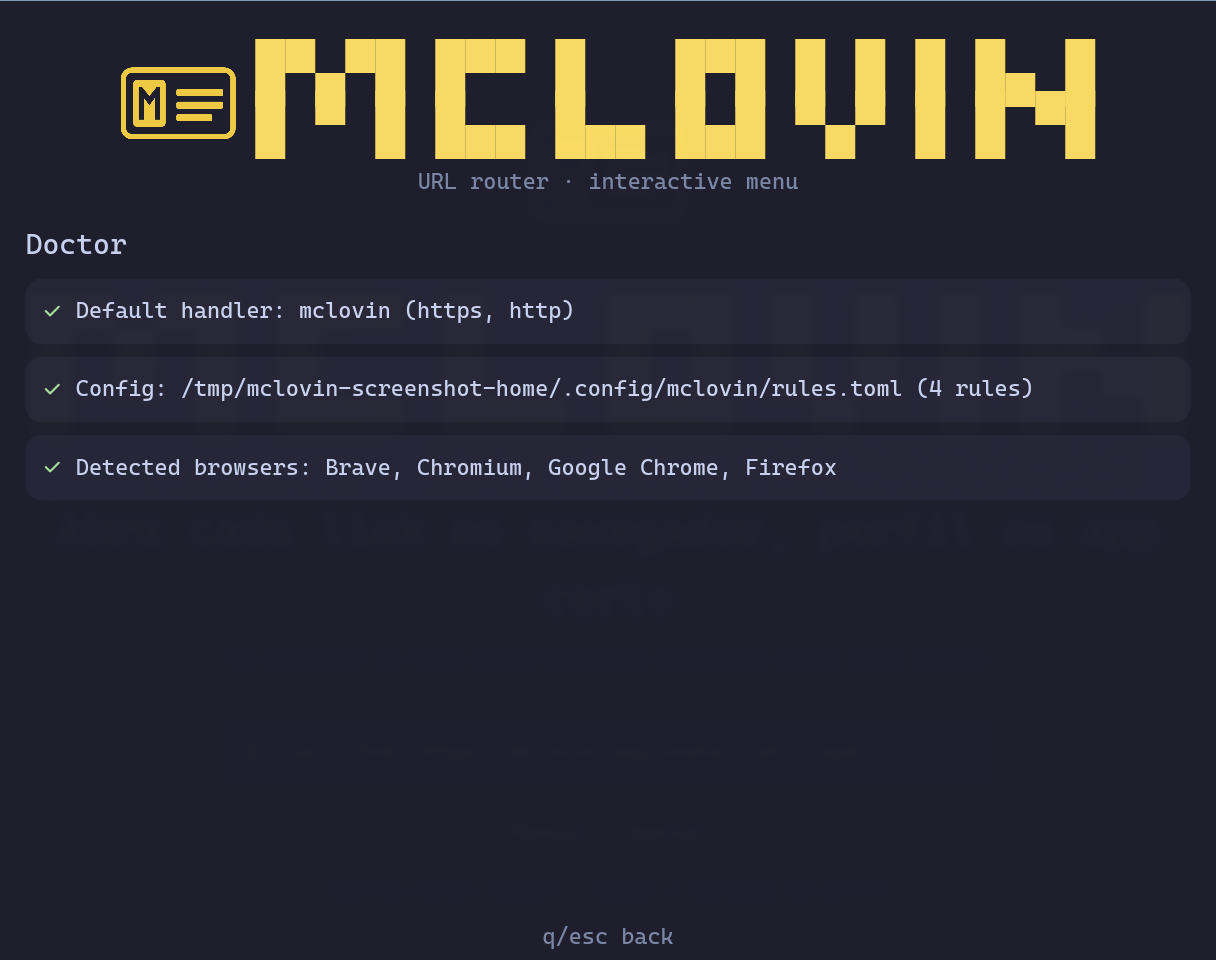
Checks handler registration, rules.toml integrity, and detected browsers. Each green line is OK; if anything turns red, it prints the exact command to fix it.
9. Language
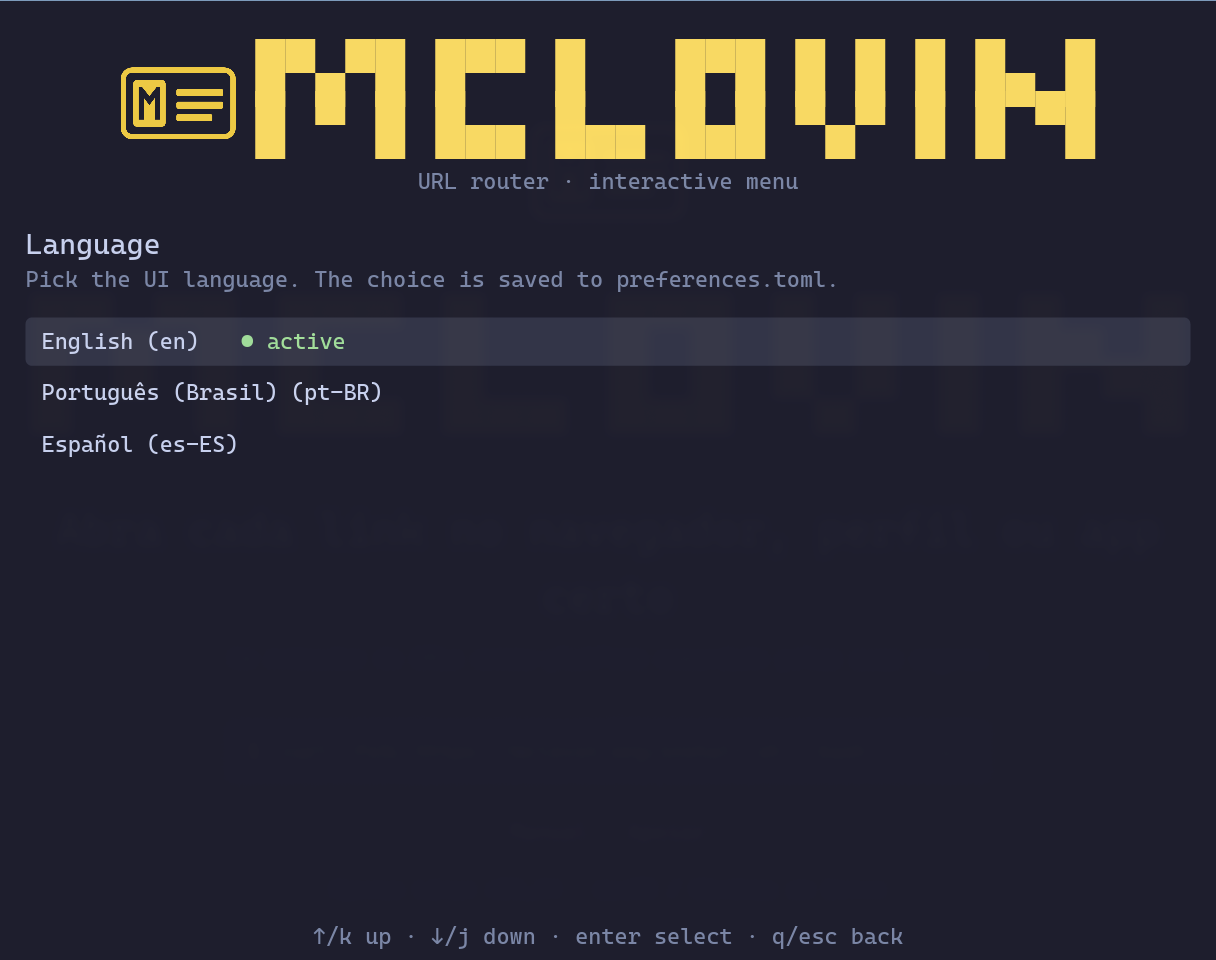
Three languages today. Switching is instant — no need to restart the GUI.
GUI shortcuts
| Shortcut | What it does |
|---|---|
↑ / ↓ or k / j | Navigate |
Enter | Activate / open |
Esc or q | Back / cancel |
Ctrl+, | From the picker into Settings |
Ctrl+D | Jump to the Default browser screen |
Ctrl+U | Jump to the Updates screen |
Every command honors --quiet (suppress non-essential output) and --json (machine-readable output where applicable).
| Command | What it does |
|---|---|
mclovin setup | Register mclovin as the system default browser |
mclovin unsetup | Revert the registration |
mclovin doctor | Diagnose the install (handler, binary, .desktop) |
mclovin match URL | Show which rule would match a URL (without opening) |
mclovin status | Usage stats |
mclovin config init | Create the initial rules.toml |
mclovin examples | Print copy-paste rules.toml recipes |
mclovin lang [LANG] | Show or change the UI language (en, pt-BR, es-ES) |
mclovin log [-f] | Show (or follow) today's log |
mclovin list-browsers | List browsers detected on the system |
mclovin rules list | List rules from rules.toml |
mclovin rules add ... | Add a rule from the CLI |
mclovin rules delete ... | Remove a rule |
mclovin default-browser | Inspect or change the system default browser |
mclovin fallback-browser | Inspect or change the fallback_browser |
mclovin settings | Open the settings GUI |
mclovin update | Check and install updates |
mclovin --app=URL | Open a URL as a webapp (chromeless window) |
mclovin --help lists everything. mclovin <command> --help shows per-command details.
How it works
[user clicks a link]
        ↓
[OS hands the http/https URL to mclovin]
        ↓
[mclovin reads ~/.config/mclovin/rules.toml]
        ↓
   ┌──────────────────────┐
   │ does any rule match? │
   └──────────────────────┘
       yes ↓                 no ↓
[launch browser/command]   [picker asks]
mclovin is a single Rust binary with two frontends sharing the same core: CLI (scripts) and GUI (mclovin settings). Rules live on disk in rules.toml, so either frontend reads the same reality.
Auto-updates
mclovin checks for new versions in the background every 2 hours, against the mclovin-release repo. To turn it off: set auto_update_check = false in ~/.config/mclovin/preferences.toml.
To force a check, open Updates and click "Check for updates". The button is debounced 10 seconds between consecutive clicks to avoid hammering the GitHub API.
When a new version is available:
- The screen shows
current version → new versionin yellow - Clicking "Install now" downloads the binary, verifies the
sha256, and installs - A countdown shows
Restarting in 5… 4… 3… 2… 1… - mclovin restarts itself into the new version, landing back on the same screen you were on
If you reached Updates via Ctrl+U from the picker, mclovin remembers that across the restart and bounces you back to the picker when you press Esc on Updates.
Advanced — terminal only
Things the GUI doesn't expose, all sitting in ~/.config/mclovin/rules.toml. Edit it via mclovin settings → "Open config file" or with your editor of choice.
rules.toml reference
Each rule is a [[handler]] block. The three match forms below are the same ones the GUI exposes — here's the TOML equivalent.
# Substring — most common
[[handler]]
match = "github.com"
browser = "brave"
description = "GitHub on Brave"

# List — any item matches
[[handler]]
match = ["wa.me", "web.whatsapp.com", "api.whatsapp.com"]
command = "zapzap"
description = "WhatsApp via ZapZap"

# Regex — full control + capture groups
[[handler]]
match_regex = '^https?://open\.spotify\.com/(\w+)/([^?#/]+)'
rewrite = "spotify --uri=spotify:{1}:{2}"
description = "Spotify desktop"
Browser vs command
# Browser detected by mclovin (reads the .desktop)
browser = "brave"

# Browser + specific profile
browser = { name = "google-chrome", profile = "Work" }

# Raw shell command (use {url} to insert the URL)
command = "firefox --new-window {url}"
Fallback and catch-all
fallback_browser = "brave"

# OR: catch-all rule (every unmatched URL lands in Brave, no picker)
[[handler]]
match_regex = '.*'
browser = "brave"
External picker (fuzzel, walker, wofi, rofi, bemenu)
Instead of the built-in iced picker you can delegate to a system launcher:
[picker]
enabled = true
command = "fuzzel"
options = ["--dmenu"]
The launcher takes options on stdin and returns the choice on stdout — dmenu convention. To disable the picker entirely (and send everything to fallback_browser): enabled = false.
Dynamic rules with Lua (match_lua)
When the match doesn't fit substring/regex — time-of-day, parsed host, query string — write a Lua snippet:
# Atlassian only during business hours
[[handler]]
match_lua = """
local h = ctx.now.hour
return (h >= 9 and h < 18) and ctx.url.host:match('atlassian') ~= nil
"""
browser = { name = "google-chrome", profile = "Work" }
description = "Atlassian on business hours"
ctx carries url (with .full, .host, .path, .query), now (.hour, .minute, .weekday), and source (the app that originated the link, when available).
Complex transforms with rewrite_lua
To rewrite URLs in ways regex + template can't (signing, decoding, lookups):
[[handler]]
match = "internal.api.example"
rewrite_lua = """
return ctx.url.full:gsub('^http://', 'https://'):gsub('/v1/', '/v2/')
"""
browser = "brave"
Webapp mode (mclovin --app=URL)
Open a URL as a dedicated app (window without address bar, its own taskbar icon) using the [webapp].browser configured:
mclovin --app=https://meet.google.com/abc-xyz
Useful for .desktop shortcuts. On Omarchy, integrate via mclovin webapp-fix (run once) so the Omarchy launcher also recognises mclovin as a webapp handler.
More recipes
mclovin examples prints three copy-paste blocks: basic substring/list, regex + rewrite, and the more elaborate Lua scenarios.
Troubleshooting
Where things live
| File | What |
|---|---|
~/.config/mclovin/rules.toml | Routing rules |
~/.config/mclovin/preferences.toml | Language, auto-update |
~/.cache/mclovin/log.YYYY-MM-DD | Daily log |
~/.cache/mclovin/update_check.toml | Update-check cache |
~/.local/bin/mclovin | Canonical binary |
~/.local/share/applications/mclovin.desktop | MIME entry for http / https |
Diagnose
mclovin doctor          # full check
mclovin log -f          # follow today's log live
mclovin --version       # the binary on $PATH
mclovin match https://github.com/foo/bar    # which rule would match
"Wrong version" after an update
You may have two binaries on the system (~/.local/bin/mclovin and ~/.cargo/bin/mclovin if you installed via cargo install previously). setup points everything at the canonical ~/.local/bin/ path, but it's worth checking:
which -a mclovin
ls -la ~/.local/bin/mclovin ~/.cargo/bin/mclovin 2>/dev/null
If you have two, copy the newer one over the older:
install -m 755 ~/.local/bin/mclovin ~/.cargo/bin/mclovin
Reset the update-check cache
rm ~/.cache/mclovin/update_check.toml
Next launch, mclovin re-queries the public release.
Hit a problem? Open an issue on GitHub.